Posts

Showing posts with the label github

Dipping My Toes Into Github Actions 🤖🏭
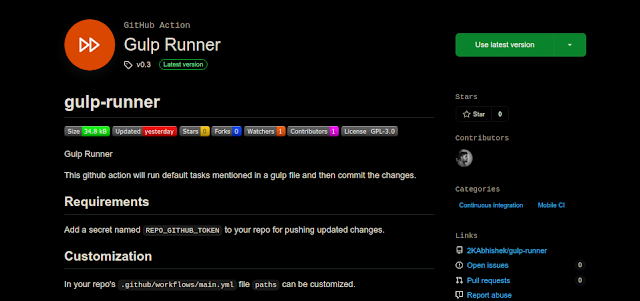
Image
 Hello Github Actions GitHub actions are something that I was always curious about but never really explored, recently I took a dive and was able to come up with something that actually solves one of my problems. Gulp Runner on GitHub Actions Marketplace Gulp Runner Like many of us, I have a portfolio site deployed on GitHub Pages. 🌐 It uses SCSS so I have to convert it to CSS pre-deployment, I also like to have my scripts and styles minified. While building the site I used gulp for these tasks and everything worked as it should. The only issue is when I have to make some quick updates to the styles or scripts on a new machine or on my phone, I have to setup the local dev environment along with node, npm and lots of node modules. While reading up on GitHub actions this is the problem that came up to my mind, that can be fixed quite easily using a simple workflow. 🤔 What this action does is, on push events it looks at changes in the script and styles file. If it does find any cha...

Manage all your GitHub repositories easliy 🗃️☁️

Image
Do you have a lot of repositories on GitHub and are always making changes to them?  Do you work on multiple machines, and are struggling to keep the repositories in sync? Have you ever moved to a new machine and spent what seems like an eternity cloning all your projects one by one? If your answer to any of these questions was yes, well I have a solution for you.  Introducing  GHPM - GitHub Project Manager It is a utility to fix a few problems a developer faces while managing GitHub projects. GHPM allows you to clone all the repositories in a user's GitHub profile, saving you lots of time. All the repositories will be cloned in the current directory. It lets you pull and push changes for all the git repositories in a directory, saving you lots of cd and git pull/push. It also has a option to quickly change the remote repository protocol from http to ssh, so you don't have to manually use it. You can find all the installation and usage information here . If you...

Sync Forked Repository With Upstream 🔁✔️

Here's the situation, You have forked a repository on GitHub, you have made your changes and sent a pull request and that request has been merged.  Now you want to make further changes, but the repository mentions that you are X commits ahead or/and X commits behind upstream repository. So how do you sync it? You can delete your fork and fork the original repository again, but that is a very tedious thing to do. Here's another way to do this: 1. Clone your fork git clone https://github.com/yourname/repo.git cd yourname/repo 2. Add upstream remote git remote add upstream https://github.com/original-author/repo.git git fetch upstream 3. Ignore all changes in fork and sync with upstream git reset --hard upstream/master git push -f origin master Only do this if you have no changes on your fork that you will like to keep. This will set your fork's master to be the same as upstream's master. Now you are free to make any changes you wish to...

Trim Unnecessary Files From Git History ✂️🗃️

Image
Here's a common scenario, You have committed a file to your git repo and have also pushed to remote. The file wasn't supposed to be there, maybe it was something you forgot to mention in your`gitignore` or something that was supposed to be an environment variable or maybe it was a binary not related to the project at all ( Cat GIFs? 😉). This not only raises some security concerns but also drives the  size of your repository up and simply deleting the file won't fix the problem. Here's how to fix it using a few commands: 1) Clone your repo and make sure all branches are up-to-date with remote. 2) Identity the filename and its path that you want to remove. 3) Then using git filter-branch remove the files from history. git filter-branch --tag-name-filter cat --index-filter \ "git rm -r --cached --ignore-unmatch filename" --prune-empty -f -- --all 4) Remove the files from the local repo. rm -rf .git/refs/original/ git reflog expire...